
C Language
What is Language?
A programming language is a formal language used to communicate instructions to a computer. These instructions tell the computer what to do — such as perform calculations, store data, show results, or control hardware.
There are 2 types of languages, known as
- Low-level languages
- Machine/Binary Language
- Assembly Level Language
- High-level languages
Low Level Languages
What is Machine/Binary language?
Binary language is the fundamental language of computers, made up of only two digits: 0 and 1 These digits are known as binary digits or bits. It is a machine-understandable format.
Data is stored in the form of binary, CPU processes instructions in binary, and communication between systems (network) is in the form of binary.
What is Assembly Level language?
Assembly language is a low-level programming language that is one step above machine language (binary), and is closely related to the computer’s hardware. It uses mnemonics (short English-like codes) to represent machine-level instructions.
For example:
- LOAD 55 1002H ; Store value 55 into 1002H memory.
- MOV AX, 5 ; Move the value 5 into register AX
- ADD AX, 2 ; Add 2 to AX
| Feature | Machine Language | Assembly Language | High-level Language |
|---|---|---|---|
| Human readable | No | 50% | Yes |
| Easy to Write/Debug | No | 50% | Yes |
| Speed | Very fast | Very fast | Slow |
| Portability | No | No | Yes |
Applications of Assembly Language:
Assembly languages are used in the following areas…
- Embedded Systems
- Device Drivers
- Traffic Signaling
- Operating Systems
- System Boot Programs etc.,
High Level Languages
Language Fundamentals
C Character Set
In C language, the character set refers to the collection of valid characters that the C compiler recognizes and can use to write programs. This character set includes…
- Letters:
- Uppercase Alphabet: A-Z
- Lowercase Alphabet: a-z
- Digits: 0-9
- Special Symbols: ~ ! @ # % ^ & * ( ) _ – + = { } [ ] | \ : ; ” ‘ < > , . ? /
- White Spaces: Space, tab(\t), New line (\n), Carriage return(\r), form feed (\f), etc.,
C Tokens
In C language, tokens are the smallest individual units (or building blocks) of a C program that the compiler can recognize and process. When you write a C program, the compiler breaks it into tokens during the lexical analysis phase
Types of Tokens in C:
- Identifiers
- Keywords
- Constants
- Operators
- Strings
- Special Symbols
Identifiers
Identifiers are names given to variables, functions, arrays, etc., defined by the programmer. Rules to determine an identifier …
- Valid characters are letters(a-z,A-Z), digits(0-9), and an underscore character(_).
- It should start with a letter or an underscore.
- It should not start with a digit.
- Special characters are not allowed except an underscore.
- Identifiers are case sensitive.
- It should not be a keyword.
- If it is a constant, write in capitals.
Keywords
A keyword is a word whose meaning is defined by the language level. And also called reserved words. In C, there are 32 keywords and all are in small case.
| auto | break | case | const | continue | char | default | do |
| double | else | enum | extern | float | for | goto | if |
| int | long | register | return | short | signed | sizeof | static |
| struct | switch | typedef | union | signed | void | volatile | while |
Constants
In C, constants are fixed values that can’t be changeable during the program execution. These are two types…
- Numerical
- Integral
- Represents without decimal point values. And can be in 4 formats.
- Decimal Numbers
- Base value is 10
- The digits are 0 1 2 3 4 5 6 7 8 9
- Octal Numbers
- Base Value is 8
- The digits are 0 1 2 3 4 5 6 7
- Hexadecimal Numbers
- Base value is 16.
- The digits are 0 1 2 3 4 5 6 7 8 9 A B C D E F
- Binary Numbers
- Base value is 2
- The digits are 0 1
- Decimal Numbers
- Represents without decimal point values. And can be in 4 formats.
- Float/Real
- These are with decimal point values.
- Can be represented in two ways.
- General format
- 1.1, 123.45, -23.76,…
- Exponent format
- 12.3E5 its meaning 12.3×10⁵;
- General format
- Integral
- Non-Numerical
- These are characters like the alphabet, digits, and special characters.
- In DOS There are 256 characters.
Operators
An operator is a symbol that performs a task. There are 8 different types of operators. They are…
- Arithmetic Operators
- Assignment Operators
- Relational Operators
- Conditional/Ternary Operator
- Logical Operators
- Increment/Decrement Operators
- Bitwise Operators and
- Special Operators
Arithmetic Operators:
Arithmetic Operators are used to perform basic arithmetic operations like addition, subtraction, and so on… The Operators are…
| Operator | Meaning | Example |
|---|---|---|
| + | Addition | 10 + 3 = 13 |
| - | Subtraction | 10 - 3 = 7 |
| * | Multiplication | 10 * 3 = 30 |
| / | Division(Quotient) | 10 / 3 = 3 |
| % | Modulas (Remainder) | 10 % 3 = 1 |
Assignment Operators:
Assignment operators are used to assign a value to a variable. These operators are also called short-cut operators.
| Operator | Meaning | Example |
|---|---|---|
| = | Assignment | a = 10 (a value is 10) |
| += | After addition the value is stored in the same variable. | a += 5 (a value is 15) |
| -= | After subtraction the value is stored in the same variable. | 10 -= 8 (a value is 7) |
| *= | After multiplication the value is stored in the same variable. | 10 *= 3 (a value is 21) |
| /= | After division the value is stored in the same variable. | 10 /= 2 (a value is 5) |
| %= | After division the remainder is stored in the same variable. | a %= 3 (a value is 2) |
Relational Operators:
Relational operators are used to compare two values/expressions. These operators return either true(1) or false(0). These operators are also referred to as comparison operators.
| Operator | Meaning | Example |
|---|---|---|
| = | Assignment | a = 10 (a value is 10) |
| += | After addition the value is stored in the same variable. | a += 5 (a value is 15) |
| -= | After subtraction the value is stored in the same variable. | 10 -= 8 (a value is 7) |
| *= | After multiplication the value is stored in the same variable. | 10 *= 3 (a value is 21) |
| /= | After division the value is stored in the same variable. | 10 /= 2 (a value is 5) |
| %= | After division the remainder is stored in the same variable. | a %= 3 (a value is 2) |
Logical Operators:
Logical operators are used to compare more than two values or more than 1 expression. These operators return either true(1) or false(0). The truth table is…
| Exp1 | Exp2 | Logical AND (&&) | Logical OR (||) |
|---|---|---|---|
| true | true | true | true |
| true | false | false | true |
| false | true | false | true |
| false | false | false | false |
| Exp | ! Exp |
|---|---|
| true | false |
| false | true |
Conditional Operator:
? : is called the conditional operator. It tests the given condition; if it is true, it executes a single statement, otherwise it executes another single statement.
Syntax :
Exp1 ? Exp2 : Exp3;
Here, Exp1 is a conditional statement that returns either true(1) or false(0). If it is true, Exp2 is to be executed; otherwise Exp3 is to be executed.
Increment Decrement Operators
++ is called the increment operator, which increments the value by 1. For Example…
int a=10;
a++;
a value will be 11.
The post-increment operator (a++) increases the value of a variable by 1, but the current value is used first before the increment takes effect
Syntax: variable++;
The pre-increment operator (++i) increases the value of a variable by 1 first, and then the new value is used in the expression.
Syntax: ++variable;
— is called the decrement operator, which decrements the value by 1. For Example…
int a=10;
a–;
a value will be 9.
The post-decrement operator (a--) decreases the value of a variable by 1, but the current value is used first before the decrement takes effect
Syntax: variable–;
The pre-decrement operator (--a) decreases the value of a variable by 1 first, and then the new value is used in the expression.
Syntax: —variable;
| Operator | Example | When Increment Happens | Value Returned |
|---|---|---|---|
| Pre-increment | ++a |
First increment, then use | New value |
| Post-increment | a++ |
First use, then increment | Old value |
Bitwise Operators:
Useful in low-level programming, device drivers, encryption, networking, and compression algorithms.
The operators are…
| Operator | Symbol | Description | Example |
|---|---|---|---|
| AND | & |
Sets bit to 1 if both bits are 1 |
5 & 3 = 1 |
| OR | ` | ` | Sets bit to 1 if any one bit is 1 |
| XOR | ^ |
Sets bit to 1 if bits are different |
5 ^ 3 = 6 |
| NOT | ~ |
Flips all bits (1→0, 0→1) | ~5 = -6 |
| Left Shift | << |
Shifts bits to the left (multiplies by 2) | 5 << 1 = 10 |
| Right Shift | >> |
Shifts bits to the right (divides by 2) | 5 >> 1 = 2 |
Special Operators:
C provides some special operators that make programming easier and more efficient. These operators have special purposes and are widely used in real-world C programs. The Operators are…
| Operator | Symbol | Purpose |
|---|---|---|
sizeof |
sizeof() |
Returns size of a type or variable |
| Comma | , |
Evaluates multiple expressions, returns last one |
| Pointer | *, & |
Access value/address of variables |
| Member Access | ., -> |
Access struct members |
| Typecast | (datatype) |
Convert one type to another |
Strings
A string is a sequence of group of characters that should be enclosed within double quotes (” “). Every string ended with a NULL (‘\0’) character. For example…
- “Suresh”
- “12345”
- “11-Oct-1983”
Special Symbols
Special symbols used for structure and separation in C.
- { } – to write a block of code.
- ( ) – to define a function or function call.
- [ ] – Array creation and indexing.
- ; – Statement terminator.
- # – Pre-processor directive
Structure of C Programming
C is a structured programming language. Every C program compilation starts at a specific point and ends at a specific point. The simple C program structure is as follows…
void main()
{
C Statements;
}
If you define the C programming structure broadly, there are 3 parts
PART-1:
Documentation Section
Link Section
Constant/Macro Section
Function Declaration Section
Global Variable Declaration Section
PART-2
void main()
{
     Local Variable Declaration;
     C Statements;
}
PART-3:
user-defined function()
{
     Local Variables Declaration;
     C Statements;
}
What is documentation Section?
In C language the Documentation Section is the first part of a C program that contains written descriptions or comments about the program. It is not executed by the compiler ; it is meant for programmers to understand the code better.
The documentation section is used for the following reasons.
1. To write the heading of the program like title, author, created date, and so on...
2. To write description of the statement.
3. To hide statements from the compilation
To write documentation use the following symbols /* and  */
For Example
/* Program to find addition of two nubers */
/* This program is
   develoing by suresh */
Link Section
In C language, the Link Section is the part of a C program where header files and libraries are linked so that the program can use predefined functions and macros.
The Link Section contains statements that link your program with:
Library functions (like
printf,scanf,sqrt, etc.)Macros and constants defined in header files
This is done using the #include preprocessor directive.
#include <header_file_name> -- Searches in the system library directories.
#include "header_file_name" -- Searches in the current directory first, then in system directories.
Constant / Macro Section
The Constant or Macro Section is the part of a C program where constants and macros are defined before the program starts executing. It is usually written after the Link Section and before the main() function.
This is done using:
#definepreprocessor directive → for macros and symbolic constantsconstkeyword → for constant variables.
To define values that will not change during program execution.
To make programs easier to modify (change value in one place only).
To improve readability by giving meaningful names to fixed values.
Syntax:
     #define MACRO_NAME value
     const data_type variable_name = value;
Example:
     #define PI 3.1416 // Macro constant
     #define SQUARE(x) (x*x) // Macro function
     const int MAX = 100; // Constant variable
Function Declaration Section
The Function Declaration Section in C is where user-defined functions are declared before they are used in the program. It specifies the function name, return type, and parameters.
Syntax:
return_type function_name(parameter_list);
Global Variable Section
A global variable is a variable that is declared outside all functions (usually at the top of the program) and is accessible by all functions in the program. Declared outside main() and any other function.
Syntax:
data_type variable_name = value;
Local Variable Section
A local variable is a variable that is declared inside a function or block and is accessible only within that function or block.
Syntax:
[storage-class] data_type variable_name = value;
C Program Execution Process
Datatypes in C
Data types in C specify the type of data a variable can store and determine the amount of memory it occupies. C has 4 different types of data types:
- Primary/Basic Datatypes
- Derived/Inherited Datatypes
- User-defined Datatypes
- Empty Datatype
- Enumeration Datatypes
Primary/Basic Datatypes:
     Used to store simple values like numbers and characters. And these are 3 types known as Integers,
     Floats, and Characters.
     Integers:
          It represents without decimal point values, may be positive or negative numbers.These are classified as
          follows...
| Memory | Format Specifier | Min | Max | |||
|---|---|---|---|---|---|---|
| short | 2 bytes | %d | -32,768 | +32,767 | ||
| signed | ||||||
| long | 4 bytess | %ld | -2,14,74,83,648 | +2,14,74,83,647 | ||
| int | ||||||
| short | 2 bytes | %u | 0 | 65,535 | ||
| unsigned | ||||||
| long | 4 bytes | %lu | 0 | 4,29,59,67,295 |
Float/Real:
These are with decimal point values, and can be represented in two ways
1. General Format (2.3, -123.77, ...)
2. Exponent Format (2.3E3, 34.5E-3, ...)
Here’s the range offloat,double, andlong doublein C (based on the IEEE 754 standard). Actual values can vary
slightly depending on the compiler and system.
The actual size and range may differ between compilers (e.g., GCC vs Turbo C).
Use<float.h>to get exact ranges on your system.
| Datatype | Memory | Format Specifier | Min.Value | Max.Value | |
|---|---|---|---|---|---|
| float | 4 bytes | %f | 1.2 x 10-38 | 3.4 x 10+38 | |
| float | double | 8 bytes | %lf | 2.3 x 10-308 | 1.7 x 10+308 |
| long double | 10 bytes | %Lf | 3.4 x 10-4932 | 1.1 x 10+4932 |
character type:
The char data type in C is used to store single characters. Characters are stored as integer values according to the ASCII code.
| Memory | Min. Value | Max. Value | ||
|---|---|---|---|---|
| signed | %c | -128 | +127 | |
| char | ||||
| unsigned | %c | 0 | 255 |
Seqential Programming
Sequential programming is the process of executing all statements one by one.
Basic IO Statements.
I/O statements in C are commands that allow a program to take input from the user (Input) and display output to the user (Output). They are provided through the Standard Input/Output Library <stdio.h>.
Output Statements are used to display text/values on the screen. There are two types of output statements.
- Formated Output and
- printf()
- Syntax: printf(“text”);
- printf()
- Unformated Output
- putchar()
- Prints a single character
- Syntax:
- putchar(‘S’);
- puts()
- Prints a string on the screen.
- Syntax:
- puts(“Hi, Suresh”);
- putchar()
Input statements are used to read data from standard input device known as keyboard. There are two types.
- Formated Input Statements and
- scanf()
- syntax:
- scanf(“format Specifier”, address of variable);
- Unformated Input Statements.
- getchar()
- Reads a single character.
- Syntax::
- char getchar( );
- getche()
- Reads a single character only.
- Syntax:
- char getche( );
- getch()
- Reads a single character but it doesn’t echo the character on to the screen.
- Syntax:
- char getch( );
- gets()
- Reads a string from the keyboard.
- Syntax:
- char* gets(variable);
- getchar()
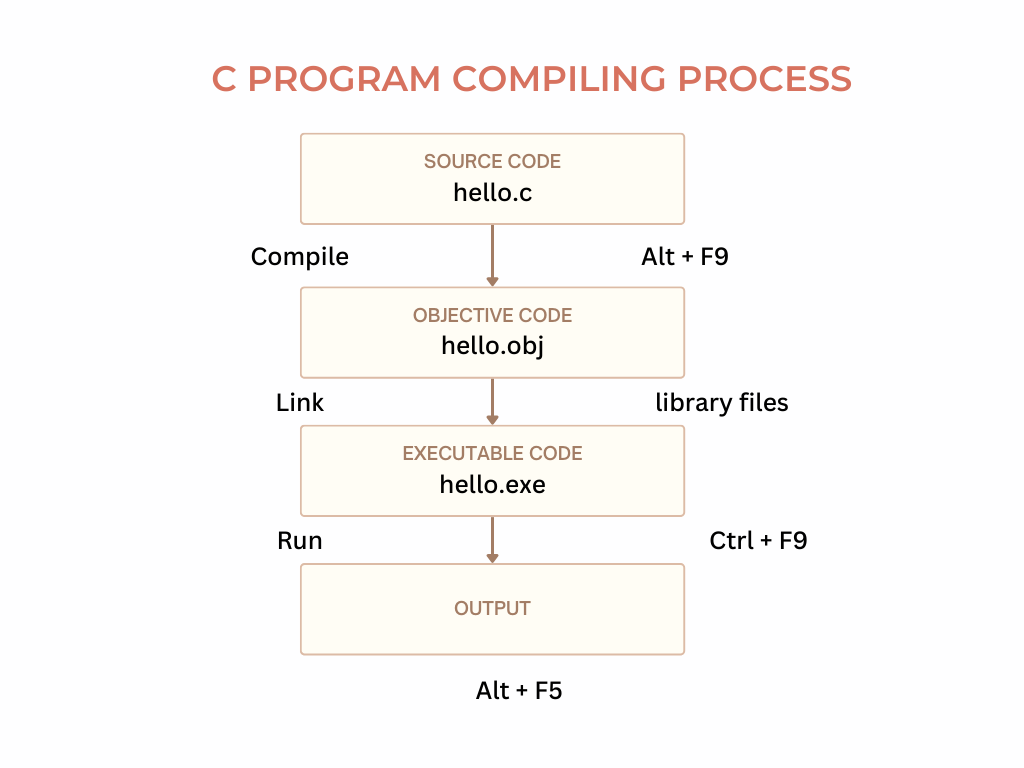
Compiling Process
To compile a C program in turbo C, you should remember the following key shortcuts.
to compile Alt + F9 or Alt + C, Enter key
to run Ctrl + F9 or Alt + R, Enter key.
to see output Alt + F5
Programs
Write a program to print a statement 'Hello world!'
#include <stdio.h>
#include <conio.h>
void main()
{
    clrscr();
    printf("Hello World!");
}
Output:
Hello World!
Write a program to print your address line by line.
#include <stdio.h>
#include <conio.h>
void main()
{
    clrscr();
    printf("Suresh CH\n");
    printf("Nellore\n");
    printf("Andhra Pradesh");
}
Output:
Suresh CH
Nellore
Andhra Pradesh
WAP to read and display an integer value.
#include <stdio.h>
#include <conio.h>
void main()
{
    int n;
    printf("Enter a number : ");
    scanf("%d",&n);
    printf("You Entered value is : %d",n);
}

Output:
Enter a number : 123
You Entered value is : 123
WAP to find addition of two numbers.
#include <stdio.h>
#include <conio.h>
void main()
{
    int a,b,sum;
    printf("Enter value1 : ");
    scanf("%d",&n);
    printf("Enter value2 : ");
    scanf("%d",&b);
    sum = a + b;
    printf("Addition : %d",sum);
}
Output:
Enter value1 : 10
Enter value2 : 20
Addition : 30
WAP to demonstrate Arithmetic Operations.
#include <stdio.h>
#include <conio.h>
void main()
{
    int a,b,sum,sub,mul,div,rem;
    clrscr();
    printf("Enter two numbers : ");
    scanf("%d%d",&a,&b);
    sum = a + b;
    sub = a - b;
    mul = a * b;
    div = a / b;
    rem = a % b;
    printf("\n %d + %d = %d",a,b,sum);
    printf("\n %d - %d = %d",a,b,sub);
    printf("\n %d * %d = %d",a,b,mul);
    printf("\n %d / %d = %d",a,b,div);
    printf("\n %d %% %d = %d",a,b,rem);
    getch();
}
Output:
Enter two numbers : 10 3
10 + 3 = 13
10 - 3 = 7
10 * 3 = 30
10 / 3 = 3
10 % 3 = 1
WAP to swap two numbers.
#include <stdio.h>
#include <conio.h>
void main()
{
    int a,b,temp;
    printf("Enter two numbers : ");
    scanf("%d%d",&a,&b);
    printf("\n Before swapping...\n a : %d \t b : %d",a,b);
    temp = a;
    a = b;
    b = temp;
    printf("\n After swapping...\n a : %d \t b : %d",a,b);
}
Output:
Enter two numbers : 10 20
Before swapping...
a : 10       b : 20
After swapping...
a : 20      b : 10
WAP to read student id, name, and 3 subjects marks from keyboard, calculate total, average marks, and display the detial.
#include <stdio.h>
#include <conio.h>
void main()
{
    int stid, tel, eng, mat, tot;
    float avg;
    char stna[20];
    clrscr();
    printf("Enter student id, name, and 3 subjects marks : ");
    scanf("%d%s%d%d%d",&stid, stna, &tel, &eng, &mat);

    tot = tel + eng + mat;
    avg = (float)tot/3

    printf("\n Number  : %d",stid);
    printf("\n Name    : %s",stna);
    printf("\n Telugu  : %d",tel);
    printf("\n English : %d",eng);
    printf("\n Maths   : %d",mat);
    printf("\n Total   : %d",tot);
    printf("\n Average : %.2f",avg);
    getch();
}
Output:
Enter student id, name, and 3 subjects marks :
Number    :
Name      :
Telugu    :
English   :
Maths     :
Total     :
Average   :
WAP to read employee id, name, and basic salary from keyboard, calculate HRA(20%), DA(55%), Gross Salary, Infometax(5%), and PF(8%), and display employee details.
#include <stdio.h>
int main()
{
int empid;
char ename[20];
float sal, hra, da, gsal, itax, pf, nsal;
printf(“Enter Employee id, name, and basic salary : “);
scanf(“%d%s%f”,&empid, &ename, &sal);
hra = sal * 20/100;
da = sal * 55/100;
gsal = sal + hra + da;
itax = gsal * 5/100;
pf = gsal * 8/100;
nsal = gsal – (itax + pf);
printf(“\n ID : %d”,empid);
printf(“\n Name : %s”,ename);
printf(“\n Basic : %.2f”,sal);
printf(“\n H.R.A. : %.2f”,hra);
printf(“\n D.A. : %.2f”,da);
printf(“\n Gross : %.2f”,gsal);
printf(“\n Incometax : %.2f”,itax);
printf(“\n Prodidend Fund : %.2f”,pf);
printf(“\n Net : %.2f”,nsal);
return 0;
}
Output:
Enter Employee id, name, and basic salary : 1001 Suresh 5600
ID : 1001
Name : Suresh
Basic : 5600.00
H.R.A. : 1120.00
D.A. : 3080.00
Gross : 9800.00
Incometax : 490.00
Prodidend Fund : 784.00
Net : 8526.00
WAP to read product id, name, price, and quantity from keyboard, calculate total amount, discount(12%), Net amount, and display the product bill.
Conditional Programming
What is conditional Programming?
Conditional programming in C language refers to the ability to make decisions during program execution based on specific conditions or expressions. It allows the program to execute different code blocks depending on whether a given condition evaluates to true (non-zero) or false (zero).
This is a fundamental concept in programming, enabling the implementation of decision-making logic.
To make decisions there are 3 different ways.
- Conditional Operators
- If Statement
- Switch Statement.
Relational, Logical, and Conditional operator.
The conditional operator in C language is a ternary operator (?:) that allows you to make decisions in a single line. It is the only ternary operator in C because it requires three operands:
Syntax:
condition ? expression_if_true : expression_if_false;
In the above syntax, condition is a boolean expression (evaluates to true or false). expression1 is to be executed if the condition is true (non-zero). expression2 is to be executed if the condition is false (zero).
Relational Operators:
In C, relational/comparison operators are used to compare two values and return either true(1) or false(0).
In C, true=1, false=0.
Any non-zero value is true.
The relational/comparison operators are…
| Operator | Expression | Return Value |
|---|---|---|
| == (is equal to) | 10==20 | 0 |
| != (is not equal to) | 10 != 20 | 1 |
| < (Less than) | 10 < 20 | 1 |
| <= (Less than or equal to) | 10 <= 5 | 0 |
| > (Greaer than) | 10 > 20 | 0 |
| >= (Greater than or equal to) | 10 >= 10 | 1 |
Logical Operators:
The logical operators are used to compare more than two values or to combine more than 1 relational operators.
These operators return either true(1) or false(0).
The logical operators are...
| Operator | Expression | Return Value |
|---|---|---|
| && (Logical AND) | (10>5 && 20>10) | 1 |
| || (Logical OR) | (10<5 || 10>20) | 0 |
| ! (Logical NOT) | ! (10<20 || 10>20) | 0 |
Programs on Conditional Operator
WAP to demonstrate Conditional Operator.
#include <stdio.h>
#include <conio.h>
void main()
{
    int n;
    clrscr();
    printf("Enter any number : ");
    scanf("%d",&n);
    (n>0) ? printf("+ve Number") : printf("-ve Number");
    getch();
}
WAP to check if the given numbe is Even or Odd.
#include <stdio.h>
#include <conio.h>
void main()
{
    int n;
    clrscr();
    printf("Enter any number : ");
    scanf("%d",&n);
    (n%2==0) ? printf("Even Number") : printf("Odd Number");
    getch();
}
WAP to find biggest of two numbers.
#include <stdio.h>
#include <conio.h>
void main()
{
    int a,b;
    clrscr();
    printf("Enter a and b values : ");
    scanf("%d%d",&a,&b);
    (a>b) ? printf("a is biggest") : printf("b is biggest");
    getch();
}
WAP to find biggest of 3 numbers.
#include <stdio.h>
#include <conio.h>
void main()
{
    int a,b,c,big;
    clrscr();
    printf("Enter a ,b , and c values : ");
    scanf("%d%d%d",&a,&b,&c);
    big = (a>b && a>c) ? a : (b>c) ? b : c;
    printf("Biggest Number is : %d",big);
    getch();
}
If Statement
What is if statement ?
The if statement in C language is a conditional control statement that allows a program to execute a block of code only if a given condition is true. If the condition is false, the code inside the if block is skipped.
Forms of if statement
The if statement is divided into 4 forms, known as
- Simple If
- If Else
- Else If Ladder
- Nested If
Simple If statement
A simple if statement in C language is the basic form of decision-making, where a block of code is executed only if a specified condition is true. If the condition is false, the program simply skips that block without executing it.
Syntax:
if (condition) {
Code to be executed if the condition is true
}
In the above syntax
The
ifis a keyword, used for decision-making.If the condition is true, the code block executes.
If the condition is false, the program skips the block.
WAP to print an absolute value of a given number.
#include <stdio.h>
#include <conio.h>
void main()
{
     int n;
     clrscr();
     printf("Enter a number  : ");
     scanf("%d",&n);
     if( n < 0 )
     {
          n = -n;
     }
     printf("Absolute value is : %d",);
     getch();
}
WAP to find biggest of two numbers.
#include <stdio.h>
#include <conio.h>
void main()
{
     int a,b;
     clrscr();
     printf("Enter a and b values  : ");
     scanf("%d%d",&a,&b);
     if( a > b )
     {
          printf("a is big");
     }
     if( b > a )
     {
          printf("b is big");
     }
     printf("Absolute value is : %d",);
     getch();
}
WAP to find biggest of three numbers.
#include <stdio.h>
#include <conio.h>
void main()
{
     int a,b,c;
     clrscr();
     printf("Enter a,b, and c values  : ");
     scanf("%d%d%d",&a, &b, &c);
     if( a>b && a>c)
          printf("a is big");
     if( b>a && b>c)
          printf("b is big");
     if( c>a && c>b)
          printf("c is big");

     getch();
}
If Else Statement
The if-else statement in C is a control structure that allows for conditional execution of code blocks. It provides a way to execute one block of code if a specified condition evaluates to true and another block of code if the condition evaluates to false.
Syntax:
if (condition) {
Block of code to be executed if condition is true
} else {
Block of code to be executed if condition is false
}
In the above syntax…
- ‘condition’ is a logical expression that evaluates to either true or false.
- If ‘condition’ evaluates to true, the block of code enclosed within the first set of curly braces {} is executed.
- If ‘condition’ evaluates to false, the block of code enclosed within the second set of curly braces {} (after the else keyword) is executed.
WAP to find biggest of two numbers
#include <stdio.h>
int main() {
int a,b;
printf(“Enter two numbers : “);
scanf(“%d%d”,&a,&b);
if(a>b) {
printf(“a is big”);
}
else {
printf(“b is big”);
}
return 0;
}
Output:
Enter two numbers : 10 20
b is big
Enter two numbers : 20 10
a is big
WAP to check if the given number is +ve or -ve
#include <stdio.h>
int main()
{
int n;
printf(“Enter n : “);
scanf(“%d”,&n);
if( n>0)
printf(“+ve number”);
else
printf(“-ve number”);
return 0;
}
Output:
Enter n : 12
+ve number
Enter n : -32
-ve numbe
WAP to check if the person is eligile or not to vote.
#include <stdio.h>
int main()
{
int age;
printf(“Enter person age :”);
scanf(“%d”,&age);
if(age>18)
printf(“Elligible to vote”);
else
printf(“Not Elligible to vote”);
return 0;
}
Output:
Enter person age :45
Elligible to vote
Enter person age :16
Not Elligible to vote
Else If Ladder Statement
The “else if ladder” in C is a control structure that allows for multiple conditional branches to be evaluated in sequence. It provides a way to handle scenarios where there are more than two possible outcomes based on different conditions.
Syntax:
if (condition1) {
Block of code to be executed if condition1 is true
} else if (condition2) {
Block of code to be executed if condition2 is true
} else if (condition3) {
Block of code to be executed if condition3 is true
}
else {
Block of code to be executed if none of the conditions are true
}
The execution process is as follows…
- Each if statement is followed by an else if statement, except for the last else statement, which is optional.
- Conditions are evaluated in sequence from top to bottom. If the condition in an if or else if statement evaluates to true, the corresponding block of code is executed, and the rest of the ladder is skipped.
- If none of the conditions in the ladder evaluate to true, the block of code associated with the else statement (if present) is executed
WAP to find biggest of three numbers
#include <stdio.h>
int main()
{
int i,j,k;
printf(“Enter 3 numbers : “);
scanf(“%d%d%d”,&i,&j,&k);
if( i>j && i>k)
printf(“First number is big”);
else if(j>k)
printf(“Second number is big”);
else
printf(“Third number is big”);
return 0;
}
Output:
Enter 3 numbers : 10 20 30
Third number is big
Enter 3 numbers : 30 20 10
First number is big
Enter 3 numbers : 20 30 10
Second number is big
WAP to print week day name by reading week day code.
#include <stdio.h>
int main()
{
int wd;
printf(“Enter week day code : “);
scanf(“%d”,&wd);
if( wd==1)
printf(“Sunday”);
else if(wd==2)
printf(“Monday”);
else if (wd==3)
printf(“Tuesday”);
else if(wd==4)
printf(“Wednesday”);
else if(wd==5)
printf(“Thursday”);
else if(wd==6)
printf(“Friday”);
else if(wd==7)
printf(“Saturday”);
else
printf(“Invalid week day code “);
return 0;
}
Output:
Enter week day code : 4
Wednesday
Enter week day code : 6
Friday
Enter week day code : 10
Invalid week day code
WAP to print no. of days of a given month.
Nested If Statement
A nested if statement in C refers to an if statement that is embedded within another if statement. This technique allows for the execution of conditional code blocks based on multiple levels of conditions.
Syntax:
if (condition1) {
Outer if block
if (condition2) {
Nested if block
Code to be executed if both condition1 and condition2 are true
}
Additional code outside of the nested if block
}
Additional code outside of the outer if block
In the above syntax:
- The outer if statement contains another if statement (the nested if statement) within its block of code.
- The nested if statement is only executed if the condition of the outer if statement evaluates to true.
- Conditions are evaluated sequentially, and the nested if statement is only executed if both the condition of the outer if statement and the condition of the nested if statement evaluate to true.
WAP to find smallest of 3 numbers
#include <stdio.h>
int main() {
int a,b,c,small;
printf(“Enter 3 numbers :”);
scanf(“%d%d%d”,&a,&b,&c);
if(a<b) {
if(a<c)
small=a;
else
small=c;
}
else {
if(b<c)
small=b;
else
small=c;
}
printf(“Smallest Value : %d”,small);
return 0;
}
Output:
Enter 3 numbers :10 20 30
Smallest Value : 10
Enter 3 numbers :20 10 30
Smallest Value : 10
Enter 3 numbers :30 20 10
Smallest Value : 10
Item #2
Item #3
Programs on if statement
Switch Statement
goto jumping statement
Iterative Programming
What is iterative or looping ?
Types of Looping Statments
While Loop
For Loop
Do While Loop
Arrays
Introduction to Arrays.
An array in C, is a secondary datatype element, that is used to store more than one value in a single variable. It allocates sequence memory blocks to store values.
Types of Arrays
Single Dimensional Arrays
Double Dimensional Arrays
Multi Dimensional Arrays
Functions
Introduction to Functions
The Anatomy of a Function
Function Components
Types of Function Calls
Scope of Variables
Storage Classes
Advanced Function Concepts
The main() Function
Library Functions
ctype.h library
The ctype.h header declares a set of functions that are used for testing and mapping characters. Makes character-checking code much more readable and intentional
These functions check if a character c belongs to a certain category. They return a non-zero (true) integer if the condition is true, and 0 (false) if it is false.
| Function Prototype | Description | Equivalent To (in ASCII) |
|---|---|---|
int isalnum(int c); |
Checks if c is an alphanumeric character (a letter or a digit). |
isalpha(c) || isdigit(c) |
int isalpha(int c); |
Checks if c is an alphabetic letter (uppercase or lowercase). |
isupper(c) || islower(c) |
int iscntrl(int c); |
Checks if c is a control character. (e.g., 0x00 (NUL) to 0x1F (US), and 0x7F (DEL)) |
(c >= 0 && c <= 31) || c == 127 |
int isdigit(int c); |
Checks if c is a decimal digit (0 to 9). |
c >= '0' && c <= '9' |
int isgraph(int c); |
Checks if c has a graphical representation (any printing character except space). |
isprint(c) && c != ' ' |
int islower(int c); |
Checks if c is a lowercase letter (a to z). |
c >= 'a' && c <= 'z' |
int isprint(int c); |
Checks if c is a printing character (includes space ' '). |
c >= 0x20 && c <= 0x7E (space to tilde) |
int ispunct(int c); |
Checks if c is a punctuation character (printing character that is not alphanumeric or space). |
isprint(c) && !isalnum(c) && c != ' ' |
int isspace(int c); |
Checks if c is a white-space character. (e.g., space ' ', form feed '\f', newline '\n', carriage return '\r', horizontal tab '\t', vertical tab '\v'). |
(c == ' ') || (c >= '\t' && c <= '\r') |
int isupper(int c); |
Checks if c is an uppercase letter (A to Z). |
c >= 'A' && c <= 'Z' |
int isxdigit(int c); |
Checks if c is a hexadecimal digit (0–9, a–f, A–F). |
isdigit(c) || (c >= 'a' && c <= 'f') || (c >= 'A' && c <= 'F') |